Keyboard shortcuts:
N/СпейсNext Slide
PPrevious Slide
OSlides Overview
ctrl+left clickZoom Element
If you want print version => add '
?print-pdf' at the end of slides URL (remove '#' fragment) and then print.
Like: https://wwwcourses.github.io/...CourseIntro.html?print-pdf
Functional programming concepts in JavaScript
Created for

Created by
Map/Filter/Reduce Array methods
map()
Overview
- The
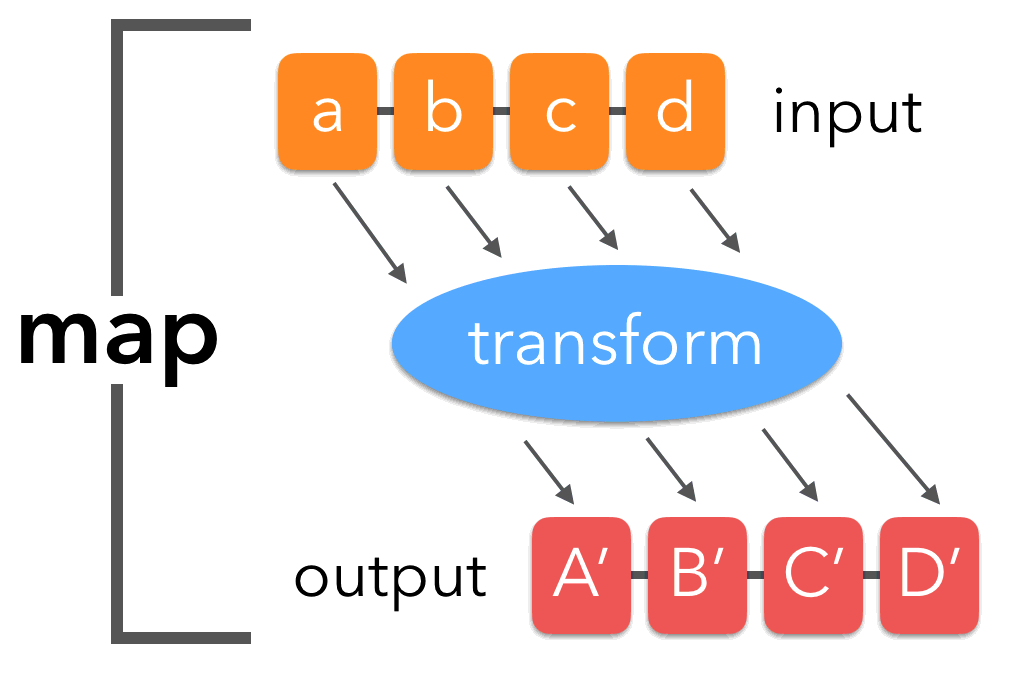
map()method creates a new array with the results of calling a provided function on every element in the calling array.
Syntax 1
newArr = arr.map( callbackFn )
- callbackFn can be defined with arrow or with classic syntax
- callbackFn is called for each element of the array. The value returned by callbackFn for each element is added to a new array, which is then returned
- The callbackFn function accepts the following arguments:
- element: The current element being processed in the array.
- index: Optional. The index of the current element being processed in the array.
- array: OptionalThe array map was called upon.
- Reference: map @mdn
            let input = ['a', 'b', 'c'];

            let output = input.map((e,i,arr)=>{console.log(e, i, arr)})

            //a 0 [ 'a', 'b', 'c' ]
            //b 1 [ 'a', 'b', 'c' ]
            //c 2 [ 'a', 'b', 'c' ]
Examples
            let input = ['a', 'b', 'c', 'd'];

            let output = input.map( e=>e.toUpperCase() )

            console.log(`input: ${input}`);
            console.log(`output: ${output}`);

            //input: a,b,c,d
            //output: A,B,C,D
            let input = ['a', 'b', 'c', 'd'];

            let output = input.map( function(e){
                return e.toUpperCase()
            } )

            console.log(`input: ${input}`);
            console.log(`output: ${output}`);

            //input: a,b,c,d
            //output: A,B,C,D
Example - using array index in callbackFn
            let input = ['a', 'b', 'c'];

            let output = input.map((e,i)=>e.toUpperCase()+i)

            console.log(output);

            // [ 'A0', 'B1', 'C2' ]
TASK_1:
            // TASK: from 'cities' array generate a new array 'cityNames' which will contain only the names of the cities
            let cities = [
                        {name: 'Sofia', population: 1_236_000},
                        {name: 'Plovdiv', population: 343_424 },
                        {name: 'Burgas', population: 202_766},
                        {name: 'Varna', population: 335_177},
            ];

            // YOUR CODE HERE:

            // TEST:
            console.log(cityNames);

            // EXPECTED OUTPUT:
            // [ 'Sofia', 'Plovdiv', 'Burgas', 'Varna' ]
TASK1 - Solution
            let cities = [
                {name: 'Sofia', population: 1_236_000},
                {name: 'Plovdiv', population: 343_424 },
                {name: 'Burgas', population: 202_766},
                {name: 'Varna', population: 335_177},
            ];

            // YOUR CODE HERE:
            const cityNames = cities.map(city=>city.name);

            // TEST:
            console.log(cityNames);

            // OUTPUT:
            // [ 'Sofia', 'Plovdiv', 'Burgas', 'Varna' ]
TASK_2
            // TASK: from 'cities' array generate a new array 'bgCityNames' which will contain only the names
            // of the cities, but mapped to their Bulgarian equivalent

            let dict = {
                'Sofia' : 'София',
                'Plovdiv' : 'Пловдив',
                'Burgas' : 'Бургас',
                'Varna' : 'Варна'
            }
            let cities = [
                        {name: 'Sofia', population: 1_236_000},
                        {name: 'Plovdiv', population: 343_424 },
                        {name: 'Burgas', population: 202_766},
                        {name: 'Varna', population: 335_177},
            ];

            // YOUR CODE HERE:


            // TEST:
            console.log(bgCityNames);

            // EXPECTED OUTPUT:
            // [ 'София', 'Пловдив', 'Бургас', 'Варна' ]
TASK2 -Solution
            let dict = {
                'Sofia' : 'София',
                'Plovdiv' : 'Пловдив',
                'Burgas' : 'Бургас',
                'Varna' : 'Варна'
            }
            let cities = [
                        {name: 'Sofia', population: 1_236_000},
                        {name: 'Plovdiv', population: 343_424 },
                        {name: 'Burgas', population: 202_766},
                        {name: 'Varna', population: 335_177},
            ];

            // YOUR CODE HERE:
            const bgCityNames = cities.map(city=>dict[city.name])

            // TEST:
            console.log(bgCityNames);

            // OUTPUT:
            // [ 'София', 'Пловдив', 'Бургас', 'Варна' ]
filter()
Overview
- The
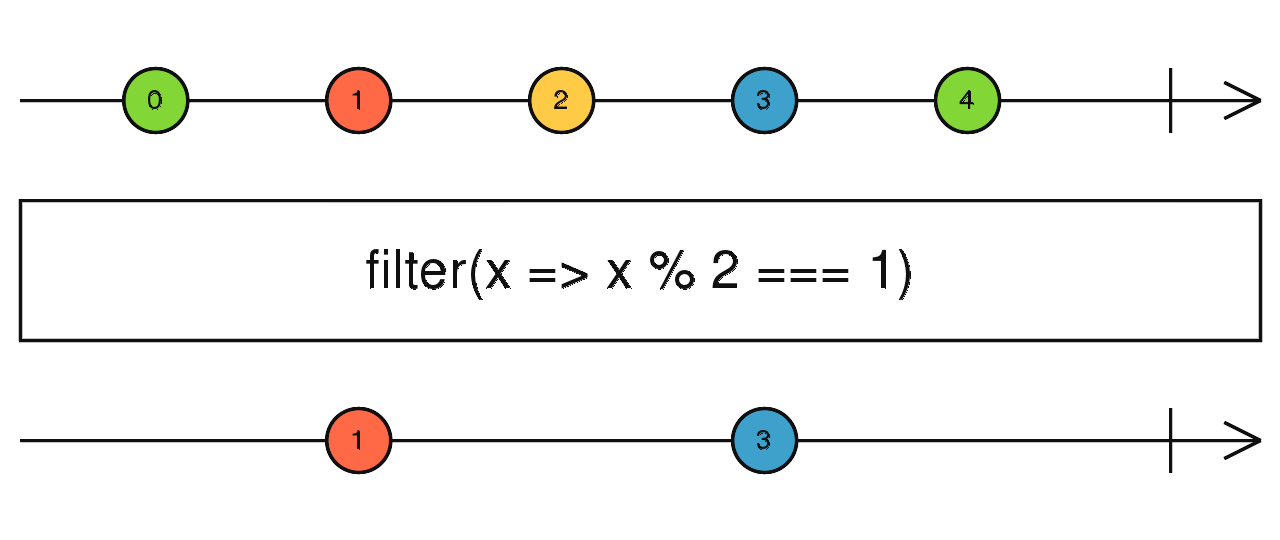
filter()method creates a new array containing only the elements from the original array that meet a specific condition. - This condition is defined by a callback function you provide
- The function is called for each element, and if it returns true, that element is included in the new array. If it returns false, the element is excluded.
- Reference: filter @mdn
Example
            const input = [0,1,2,3,4];
            const output = input.filter( x=>x%2===0);

            console.log(`input: ${input}`);
            console.log(`output: ${output}`);
TASK1
            // TASK: filter only cities which population is greater than 340_000
            const cities = [
                {name: 'Sofia', population: 1_236_000},
                {name: 'Plovdiv', population: 343_424 },
                {name: 'Burgas', population: 202_766},
                {name: 'Varna', population: 335_177},
            ];

            // YOUR CODE HERE:


            // TEST:
            console.log(populatedCities);

            // EXPECTED OUTPUT:
            // [
            // 	{ name: 'Sofia', population: 1236000 },
            // 	{ name: 'Plovdiv', population: 343424 }
            // ]
TASK1 - Solution
            const cities = [
                {name: 'Sofia', population: 1_236_000},
                {name: 'Plovdiv', population: 343_424 },
                {name: 'Burgas', population: 202_766},
                {name: 'Varna', population: 335_177},
            ];

            // YOUR CODE HERE:
            const populatedCities = cities.filter(city=>city.population>340_000)

            // TEST:
            console.log(populatedCities);

            // OUTPUT:
            // [
            // 	{ name: 'Sofia', population: 1236000 },
            // 	{ name: 'Plovdiv', population: 343424 }
            // ]
reduce()
Overview
- The
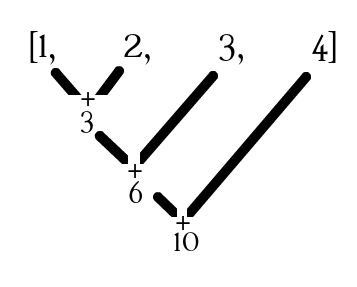
reduce()method executes the provided callback function on each element of the array to reduce the array to a single output value. - Reference: reduce @mdn
let value = arr.reduce(callbackFn, [initialValue])
			let input = [1,2,3,4];

			let output = input.reduce( (acc, curr)=> {
				console.log(acc,curr)
				return acc+curr;
			} );

			console.log(`output: ${output}`);

			// OUTPUT
			// 1 2
			// 3 3
			// 6 4
			// output: 10
How it works?
let value = arr.reduce( (accumulator, current)=>{...}, [initialValue] );
(accumulator, current) => { ... }: The callback function applied to each element.- accumulator: This is the accumulated value returned from the previous iteration.
- current: This is the current element being processed in the array.
- initialValue: Optional. A value (can be any type) to which
accumulatoris initialized the first time the callback is called. - If initialValue is not specified,
accumulatoris initialized to the first value in the array, andcurrentis initialized to the second value in the array.
			let input = [1,2,3,4];

			let output = input.reduce( (acc, curr)=> {
				console.log(acc,curr)
				return acc+curr;
			}, 0 );

			console.log(`output: ${output}`);
			// OUTPUT:
			// 0 1
			// 1 2
			// 3 3
			// 6 4
			// output: 10
Example: sum of array's even numbers
- Using reduce() only - difficult to read and write.
			let input = [1,2,3,4];

			let output = input.reduce( (acc, curr)=> curr%2==0?acc+curr:acc, 0);

			console.log(`output: ${output}`);
- Using filter().reduce() - better approach:
			let input = [1,2,3,4];

			let output = input.filter(el=>el%2==0).reduce((acc,curr)=>acc+curr)

			console.log(`output: ${output}`);
forEach()
Overview
- The forEach method in JavaScript is used to execute a provided function once for each element in an array.
- It is a simple and effective way to iterate over array elements without needing a traditional for loop.
- callback: A function that will be executed for each element in the array.
- currentValue: The value of the current element being processed.
- index (Optional): The index of the current element being processed.
- array (Optional): The array that forEach is iterating over.
- Note that forEach does not return a new array; it returns undefined.
                array.forEach(callback(currentValue, index, array) {
                    // Code to execute for each element
                }, thisArg);
Example
            const numbers = [1, 2, 3, 4, 5];

            // Using forEach to log each number and its index:
            numbers.forEach(function(number, index) {
                console.log(`Index ${index}: ${number}`);
            });

            // Using an arrow function
            numbers.forEach((number, index) => {
                console.log(`Index ${index}: ${number}`);
            });
TASK1
            //TASK: calculate the total sales from an array of sales objects using the forEach method

            // GIVEN
            const sales = [
                { product: 'Laptop', amount: 1000 },
                { product: 'Phone', amount: 500 },
                { product: 'Tablet', amount: 300 }
            ];

            // YOUR CODE HERE


            // TEST
            console.log(totalSales);

            // EXPECTED OUTPUT:
            // 1800
TASK1 - Solution
            //TASK: calculate the total sales from an array of sales objects using the forEach method

            // GIVEN
            const sales = [
                { product: 'Laptop', amount: 1000 },
                { product: 'Phone', amount: 500 },
                { product: 'Tablet', amount: 300 }
            ];

            // YOUR CODE HERE
            let totalSales = 0;
            sales.forEach(sale => totalSales += sale.amount);

            // TEST
            console.log(totalSales);

            // OUTPUT:
            // 1800
TASK2
            //TASK: You are given an array of user objects.
            //Add an isAdmin property to each user object based on the user's role within the array of user objects.

            // GIVEN
            const users = [
                { name: 'Maria', role: 'user' },
                { name: 'Ivan', role: 'admin' },
                { name: 'Stoyan', role: 'user' }
            ];

            // YOUR CODE HERE


            // TEST
            console.log(users);

            // EXPECTED OUTPUT:
            // [
            //     { name: 'Maria', role: 'user', isAdmin: false },
            //     { name: 'Ivan', role: 'admin', isAdmin: true },
            //     { name: 'Stoyan', role: 'user', isAdmin: false }
            // ]
TASK2 - Solution
            //TASK: You are given an array of user objects.
            //Add an isAdmin property to each user object based on the user's role within the array of user objects.

            // GIVEN
            const users = [
                { name: 'Maria', role: 'user' },
                { name: 'Ivan', role: 'admin' },
                { name: 'Stoyan', role: 'user' }
            ];

            // YOUR CODE HERE
            users.forEach(user => {
                user.isAdmin = user.role === 'admin';
            });

            // TEST
            console.log(users);

            // EXPECTED OUTPUT:
            // [
            //     { name: 'Maria', role: 'user', isAdmin: false },
            //     { name: 'Ivan', role: 'admin', isAdmin: true },
            //     { name: 'Stoyan', role: 'user', isAdmin: false }
            // ]
find Array method
find()
Overview
- The
find()method returns the first element in the array that satisfies the condition specified by the provided callback function.arr.find(callbackFn) - The callback function is called for each element in the array.The method stops when it finds the first match which is returned. If no element satisfies the condition, it returns
undefined. - Reference: find @mdn
Example
            const input = [1, 2, 3, 4, 5];
            const output = input.find(x => x > 3);

            console.log(`input: ${input}`);

            //output: 4
TASK1
            // TASK: Find the first city with a population greater than 500,000
            const cities = [
                {name: 'Sofia', population: 1_236_000},
                {name: 'Plovdiv', population: 343_424},
                {name: 'Burgas', population: 202_766},
                {name: 'Varna', population: 335_177},
            ];

            // YOUR CODE HERE:


            // TEST:
            console.log(firstLargeCity);

            // EXPECTED OUTPUT:
            // { name: 'Sofia', population: 1236000 }
TASK1 - Solution
            const cities = [
                {name: 'Sofia', population: 1_236_000},
                {name: 'Plovdiv', population: 343_424},
                {name: 'Burgas', population: 202_766},
                {name: 'Varna', population: 335_177},
            ];

            // YOUR CODE HERE:
            const firstLargeCity = cities.find(city => city.population > 500_000);

            // TEST:
            console.log(firstLargeCity);

            // OUTPUT:
            // { name: 'Sofia', population: 1236000 }
sort Array method
sort Array method
Overview
- The
sort()method sorts the elements of an array in place and returns the sorted array. - By default, the elements are sorted as strings in ascending order, comparing their Unicode code values.
arr.sort() - A custom sort order can be defined by providing a compare function.
arr.sort(compareFn) - To sort an array without modifying the original, you can create a copy of the array using the spread operator [...] and then sort the copy.
[...arr].sort(compareFn) - Reference: sort @mdn
How the Compare Function Works
- The compare function determines the order of elements in the array.
- It takes two arguments,
aandb, which represent two elements being compared. - The return value of the compare function dictates the sort order:
-
- If
compare(a, b) < 0,ais placed beforeb. - If
compare(a, b) > 0,ais placed afterb. - If
compare(a, b) === 0, the order ofaandbremains unchanged.
- If
- Reference: compare function @mdn
Example
- Note that, sort() without compareFn always sorts as strings.
const input = [13, 1, 4, 1, 15, 9]; input.sort() console.log(input); // [ 1, 1, 13, 15, 4, 9 ] - If you want to sort the numbers as numbers, you must provide a compareFn
                    const input = [13, 1, 4, 1, 15, 9];
                    input.sort((a,b)=>a-b);
                    console.log(input); // [ 1, 1, 4, 9, 13, 15 ]
TASK1
            // TASK: Sort the cities array in descending order of population
            const cities = [
                {name: 'Sofia', population: 1_236_000},
                {name: 'Plovdiv', population: 343_424},
                {name: 'Burgas', population: 202_766},
                {name: 'Varna', population: 335_177},
            ];

            // YOUR CODE HERE:


            // TEST:
            console.log(sortedCities);

            // EXPECTED OUTPUT:
            // [
            //   { name: 'Sofia', population: 1236000 },
            //   { name: 'Plovdiv', population: 343424 },
            //   { name: 'Varna', population: 335177 },
            //   { name: 'Burgas', population: 202766 }
            // ]
TASK1 - Solution
            const cities = [
                {name: 'Sofia', population: 1_236_000},
                {name: 'Plovdiv', population: 343_424},
                {name: 'Burgas', population: 202_766},
                {name: 'Varna', population: 335_177},
            ];

            // YOUR CODE HERE:
            const sortedCities = cities.sort((a, b) => b.population - a.population);

            // TEST:
            console.log(sortedCities);

            // OUTPUT:
            // [
            //   { name: 'Sofia', population: 1236000 },
            //   { name: 'Plovdiv', population: 343424 },
            //   { name: 'Varna', population: 335177 },
            //   { name: 'Burgas', population: 202766 }
            // ]
HW Tasks
Tasks: JS_FunctionalProgrammingConceptsTasks.js
Tasks: JS_FunctionalProgrammingConceptsTasks.js
- The tasks are given in next template file. You can view the raw code by clicking on "view raw" in bottom-right corner
Advanced Task: analyze groupProductsByCategory.js
Advanced Task: analyze groupProductsByCategory.js
Advanced Task: analyze groupProductsByCategory.js
- Analyze next approaches used to group products by category.
- Make sure you understand all of them.
These slides are based on
customized version of
framework