Keyboard shortcuts:
N/СпейсNext Slide
PPrevious Slide
OSlides Overview
ctrl+left clickZoom Element
If you want print version => add '
?print-pdf' at the end of slides URL (remove '#' fragment) and then print.
Like: https://wwwcourses.github.io/...CourseIntro.html?print-pdf
Created for

Iva E. Popova, 2022-2023,

DBMS - Introduction
DBMS - Introduction
Why we need DataBase systems?
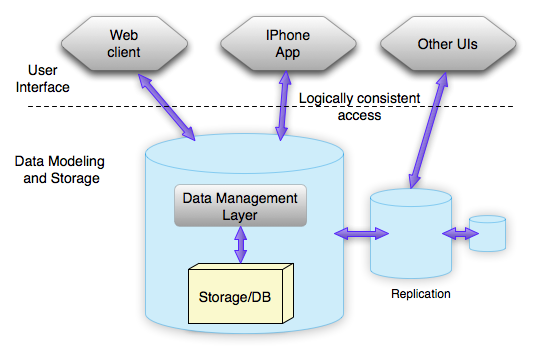
Can you imagine such a workflow using only files to store data?
Relational vs Non-Relational DataBases
or SQL vs NoSQL DataBases
SQL vs NoSQL DataBases
- Relational DataBases (SQL DataBases)
- Relational databases were developed in the 1970s.
- Data are stored as relational tables, where each row represents a single instance of the entity being modeled, and each column represents a specific attribute of that entity.
- Data manipulations are done by Structured Query Language (SQL), based on Edgar Frank Codd’s work on the relational model for database management
- No-SQL DataBases ("non SQL" or "not only SQL")
- Developed in the late 2000s
- Have flexible data models. Can handle large volumes of structured, semi-structured, and unstructured data.
- Focus on scaling, fast queries and frequent application changes.
Reference: Differences between SQL and NoSQL
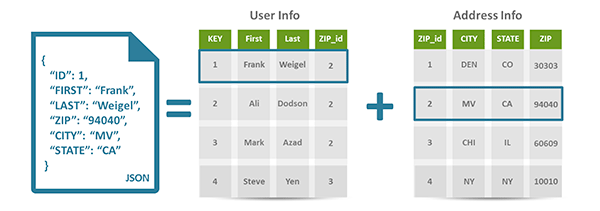
- On the left, the JSON document represents how data is typically stored in a NoSQL database
- On the right, the two tables ("User Info" and "Address Info") represent how the same data would be normalized and stored in a SQL database.
- The relationship between 2 tables is established by foreign key, shown in the image as 'ZIP_id'.
NoSQL common data structures
NoSQL common data structures
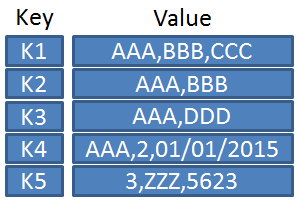
Key-Value Store Databases
- Data is represented as a collection of Key-Value pairs, an attribute name and a value, e.g., <department, sales> or <salary, 2300>.
- Advantages:
- Flexibility: Easy to add or modify key-value pairs without schema changes.
- Memory Efficiency: Uses far less memory compared to other data models, especially when used as in-memory databases.
- Popular Systems:
- Redis, Memcached, Berkeley DB
- Common Use Cases:
- Caching, session management, real-time data analytics.
Wide Column Store Databases
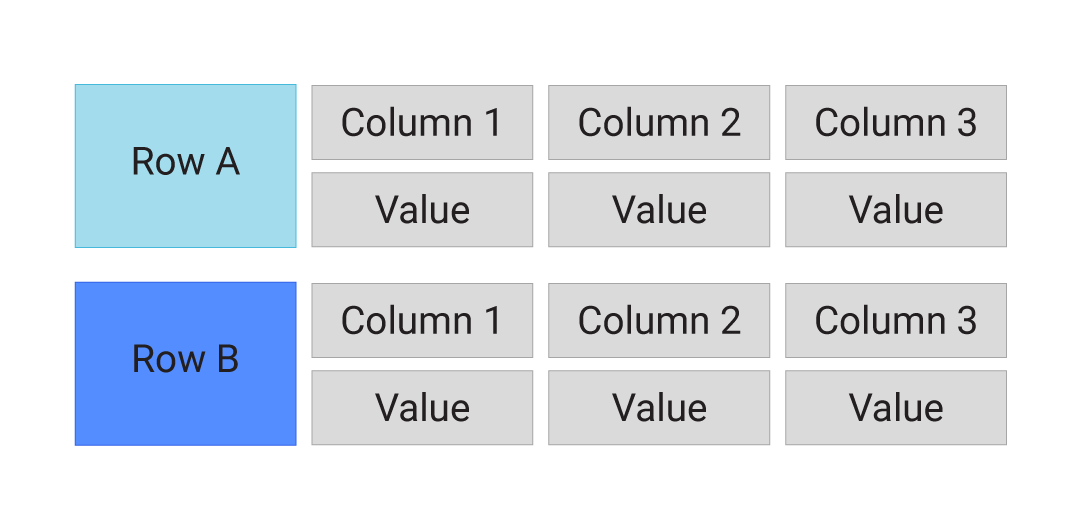
- Wide Column Store Databases use tables, rows, and columns similar to a relational database, but with a key difference: the names and formats of the columns can vary from row to row within the same table. Essentially, a wide column store can be interpreted as a two-dimensional key-value store, offering more flexibility in data storage.
- Popular Systems:
- Apache Cassandra, HBase, Azure Tables, Bigtable
- Advantages:
- Flexibility: Can handle dynamic and varied data structures within the same table.
- Scalability: Designed to handle large volumes of data across distributed systems efficiently.
- Common Use Cases:
- Real-time data processing, IoT data management, time-series data, and large-scale data analytics.
Graph Databases
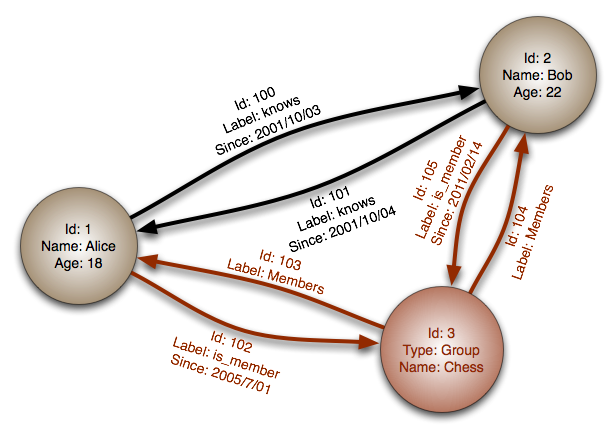
- Focuses on the relationships between data.
- A graph is composed of two elements: nodes and relationships. A node represents an entity, and a relationship represents how two nodes are associated. In the graph world, these relationships are often more important than the individual nodes or data points.
- The underlying storage mechanism of graph databases can vary: some use the relational model and store the graph as tables, others use a key-value store or document-oriented database.
- Popular Systems:
- Neo4j, Ontotext GraphDB
- Advantages:
- Efficiently handles complex relationships and queries.
- Ideal for social networks, recommendation systems, and network analysis.
Document Store Databases
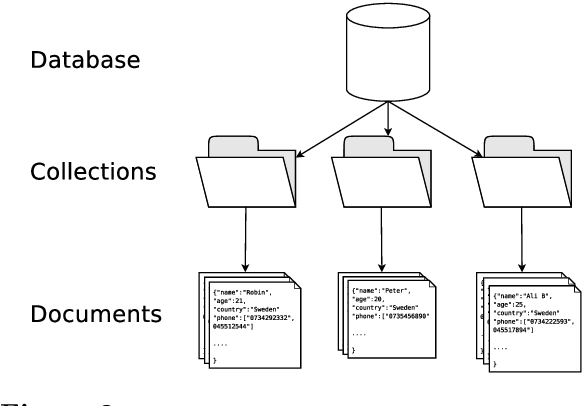
- Data is encapsulated in a 'document' which is a standard format or encoding, such as XML, YAML, or JSON.
- Each document has a unique 'key' to identify it.
- Documents can be grouped using collections, tags, metadata, or directory hierarchies. Collections are similar to tables in a relational database, and documents are similar to records. However, unlike relational databases, documents in a collection can have different fields.
- Advantages:
- Flexibility: Documents can have varying structures, making it easy to adapt to changing data requirements.
- Scalability: Designed to handle large volumes of data across distributed systems.
- Performance: Optimized for fast retrieval of documents.
- Popular Systems:
- MongoDB, CouchDB, Elasticsearch
Mongodb - getting started
Mongodb - getting started
What is Mongodb
- Mongodb is a document-orientated database
- One of the most popular NoSQL databases
- The name comes from humongous (huge; enormous. )
- Mongodb saves data in BSON (Binary JSON) format, which was modeled after the JSON format (JavaScript Object Notation)
- Mongo Official site is: mongodb.com
Installation
- Install from:
- MongoDB Community Server
- But its better to follow the docs:
- Install MongoDB Community Edition @docs.mongodb.com
- Visual Tutorial: How to Install MongoDB
Install MongoDB Shell (Windows Only)
- MongoDB Shell (mongosh) does not come with the MongoDB Community Edition. You need to install it separately after successfully installing the MongoDB server on your windows 10 system.
- Download it from MongoDB Shell
- Do not forget to add the MongoDB Shell binary's location to your PATH environment variable
Run MongoDB Community Edition
If Mongo Server is not started, you can start it manually by:
Test the installation
- Check the MongoDB Server installed version:
- Check the MongoDB Shell installed version:
mongod --version
                db version v7.0.5
                Build Info: {
                    "version": "7.0.5",
                    "gitVersion": "7809d71e84e314b497f282ea8aa06d7ded3eb205",
                    "openSSLVersion": "OpenSSL 3.0.2 15 Mar 2022",
                    "modules": [],
                    ...
                }
mongosh --version
                MongoDB shell version v4.4.9
                connecting to: mongodb://127.0.0.1:27017/?compressors=disabled&gssapiServiceName=mongodb
                Implicit session: session { "id" : UUID("84365a48-2b99-48e7-a5a0-8598ad39b06a") }
                MongoDB server version: 4.4.9
Mongodb data model
Mongodb data model
Overview
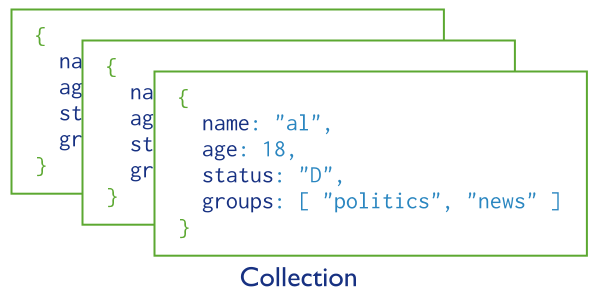
- A Mongodb databases is a set of collections of documents
- The data are stored in a document using BSON Format, which is a is a binary representation of JSON documents,
Document structure
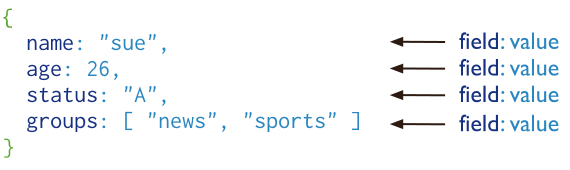
- MongoDB stores data records as BSON documents (Binary representation of JSON documents, though it contains more data types than JSON.
- Reference: BSON data types
- MongoDB documents are composed of field-and-value pairs, separated by coma.
- The value of a field can be any of the BSON data types, including other documents, arrays, and arrays of documents
MongoDB Atlas - the Mongo's Cloud DataBase
MongoDB Atlas - the Mongo's Cloud DataBase
Overview
- MongoDB Atlas is a fully-managed cloud database developed by the same people that build MongoDB
- Atlas handles all the complexity of deploying, managing, and healing your deployments on the cloud service provider of your choice (AWS, Azure, and GCP)
Create Free Atlas Plan
- You can easily Get started for free using your Google Account.
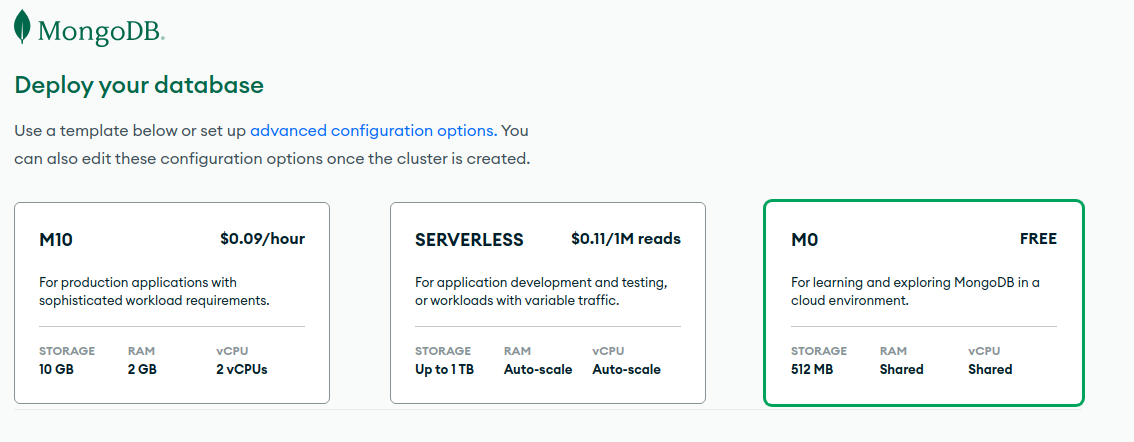
- After filling the Welcome Form, on the page "Deploy your database" select M0 Free plan:
- And click the "Create" button on the bottom of the page.
- On next page "Security Quickstart" leave the defaults, click "Create User", and on the last section "Add entries to your IP Access List" click on Add My Current IP Address button.
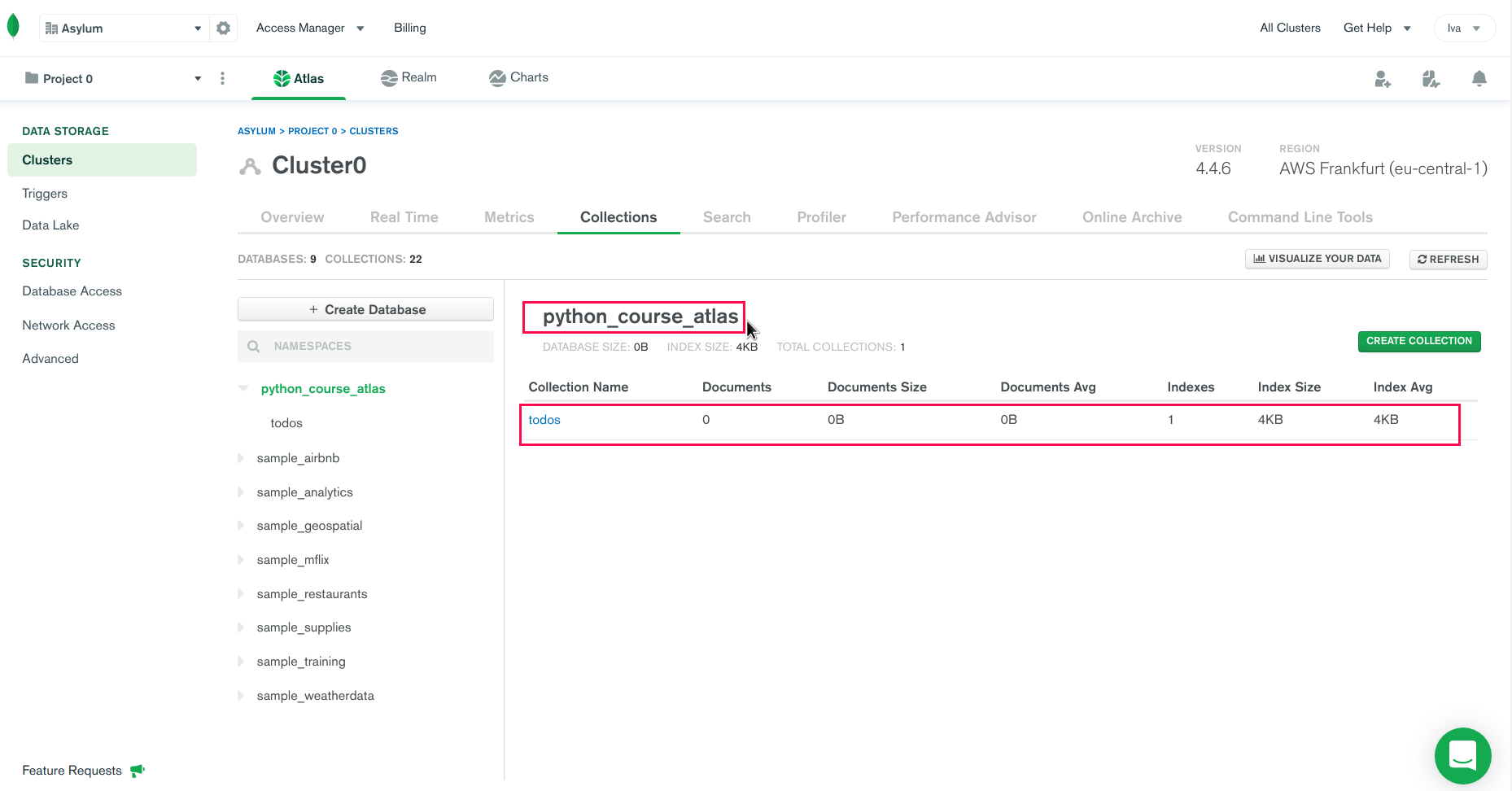
MongoDB Atlas - TASK
- Register to MongoDB Atlas and create python_course_atlas DB with 1 collection: todos, as shown
- Docs: Get Started with Atlas @docs.atlas.mongodb.com
Create Database User
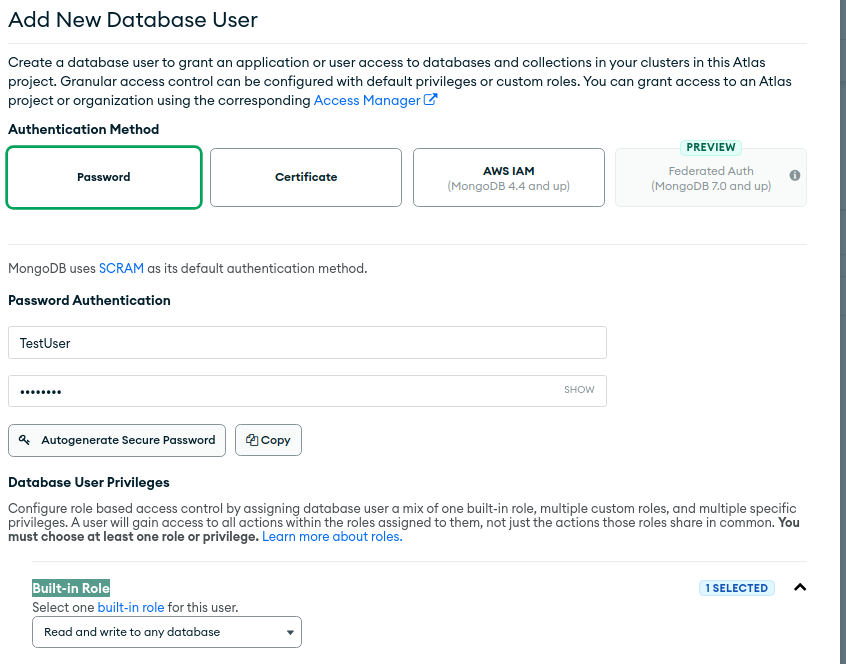
- It's a best practice, when an application needs to work on specific database, to create a separate user for connection to it, and not using your Atlas Credentials.
- In Atlas homepage, on the left side of the screen, under SECURITY section click on Database Access and then on the button "Add New Database User".
- In "Authentication Method" leave Password. In "Password Authentication" write the username and the password. Under "Built-in Role" select: "Read and write to any database". Then click on the "Add User" button.
Allow Access to Atlas
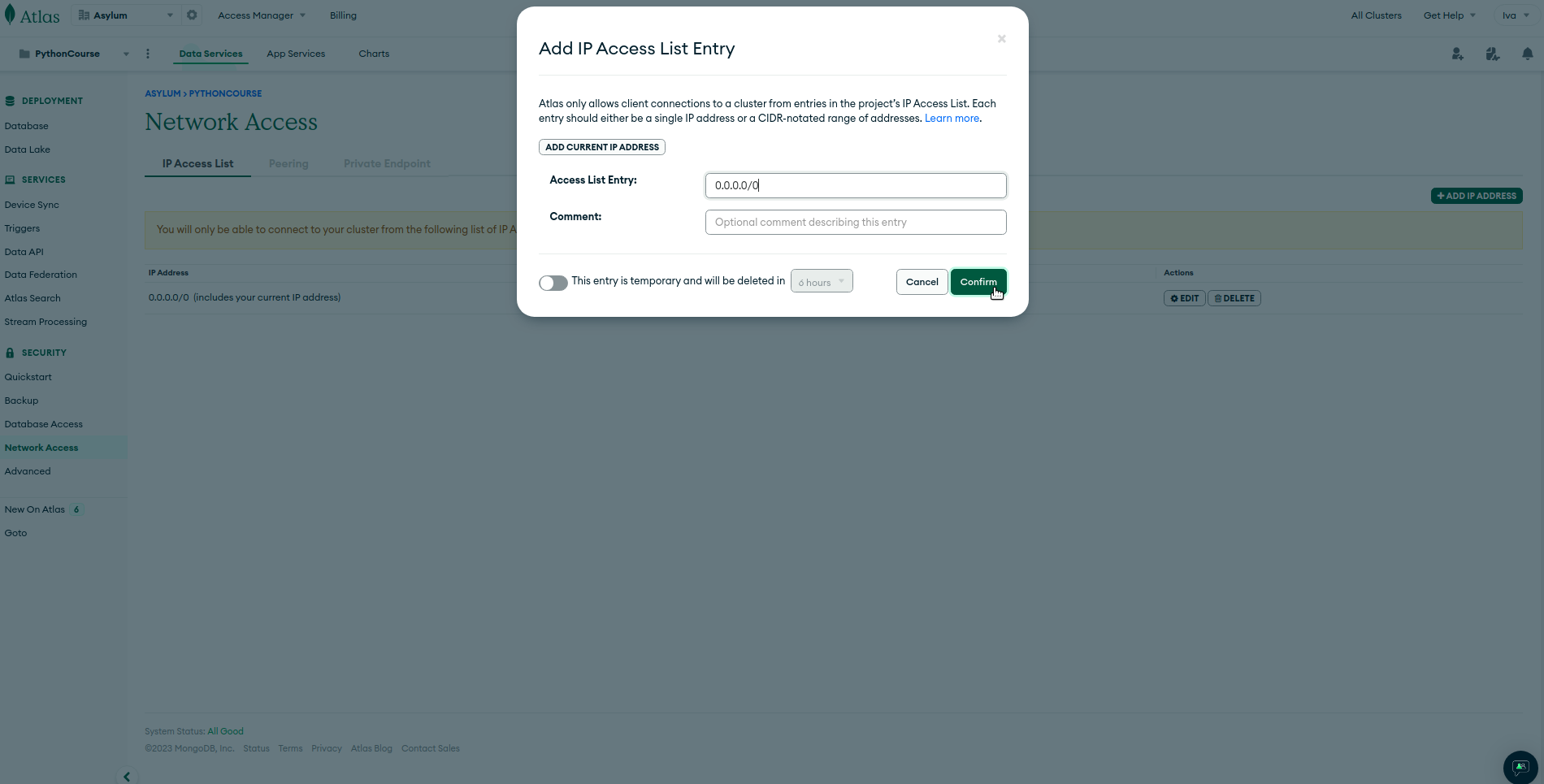
- If you want to be able to connect to your Atlas Cluster from whatever machine, then:
- In Atlas homepage, on the left side of the screen, under SECURITY section click on Network Access.
- Click the green "Add IP Address" button.
- In the modal, click the ALLOW ACCESS FROM ANYWHERE button. You should see 0.0. 0.0/0 in the Access List Entry field.
- Click the green Confirm button.
MongoDB Shell
MongoDB Shell
mongo vs. mongosh
- MongoDB Shell is the quickest way to connect to (and work with) MongoDB
- There are two separate versions of the shell.
- The
mongoshell is the old one and it is included in the MongoDB Server installation - The new
mongoshshell is a standalone product, it’s developed separately from the MongoDB Server. - You can install mongosh from here: Download MongoDB Shell
- Be sure to add the path to your mongosh.exe binary to your PATH environment variable during installation.
- Reference: Introducing the new MongoDB Shell
- Start the Mongodb Shell and check help for all commands
- Windows users notes: if you haven't added mongosh to your PATH, then you can start it by navigating to "C:\Program Files\mongosh" and the execute "mongosh.exe"
                mongosh
                # ---
                > help

Basic commands
            db.help()                    help on db methods
            db.mycoll.help()             help on collection methods

            show dbs                     show database names
            show collections             show collections in current database
            show users                   show users in current database
            use <db_name>		     set current database (create a new one, if there isn't any)
            db.mycoll.find()             list objects in collection mycoll
Work with Database
- Create Database
- There is no “create” command in the MongoDB shell. We can use the command:
use databaseon non-existing database and it will be created. If the database exist it will be set as current. db.dropDatabase()- Removes the current database, deleting the associated data files.
- Show current database
db
Work with document collections
- Collections can be created just like databases, by writing a document to them.
- Note that db refers to current database being selected with
usecommand. In example above, this is "python_course" db. - The collection into which the document is inserted is "todos". If it did not exists it will be created.
                > use python_course
                switched to db python_course
                > db.todos.insert({title: "Learn Python", completed: false})
                WriteResult({ "nInserted" : 1 })
MongoDB Compass
MongoDB Compass
- MongoDB Compass is a the official GUI (Graphical User Interface) to explore, analyze, and interact with Mongodb Database
- Download and Install Compass:
MongoDB for VS Code
MongoDB for VS Code
- Mongodb has extension for VSCode: MongoDB for VS Code
- It makes it easy to work with your data in MongoDB directly from your VS Code environment. MongoDB for VS Code is the perfect companion for MongoDB Atlas, but you can also use it with your self-managed MongoDB instances.
Connect to MongoDB
Connect to MongoDB
MongoDB URI (connection string)
- In order to connect to MongoDB, you will need a URI string.
- A URI (Uniform Resource Identifier) is similar to a URL.
- MongoDB URI must be supplied as a parameter when connecting to the mongo shell, Compass, and the MongoDB drivers
- The MongoDB URI have two forms:
- Standard connecting string:
mongodb://username:password@localhost:27017/dbname- where username, password and dbname are optional
- DNS Seed List:
mongodb+srv://server.example.com/
Connect Compass to Atlas MongoDB
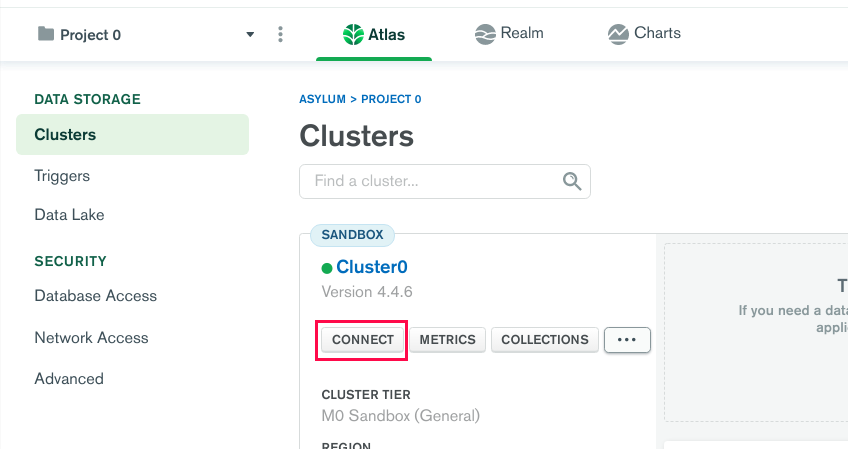
- Login to you Atlas MongoDB Cluster
- Click connect button
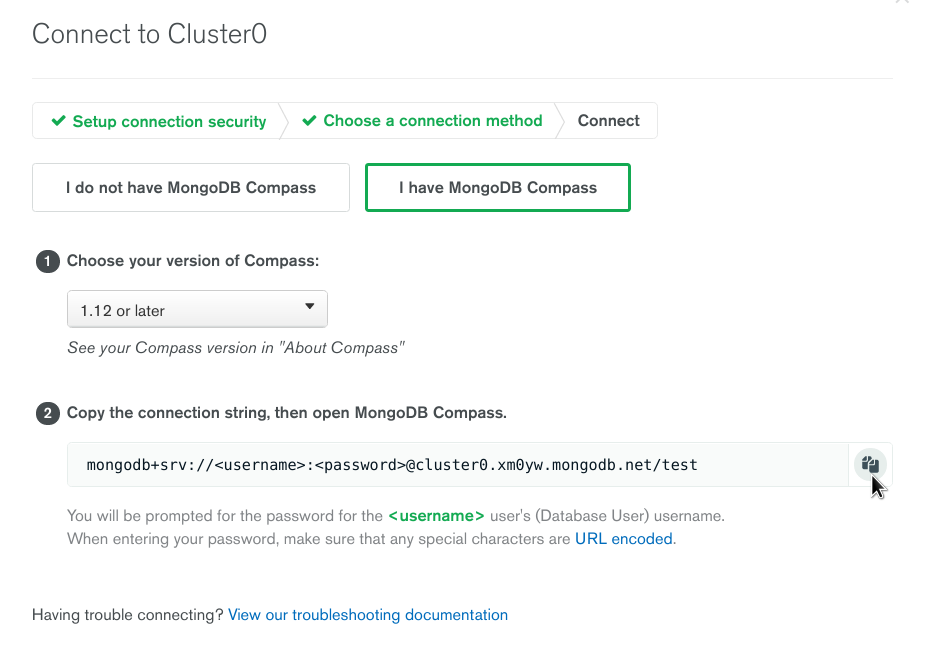
- Then select "I have MongoDB Compass"
- Choose your Compass version
- Copy the connection string
- Replace <username> and <password> with your Atlas credentials.
- The connection string must looks like:
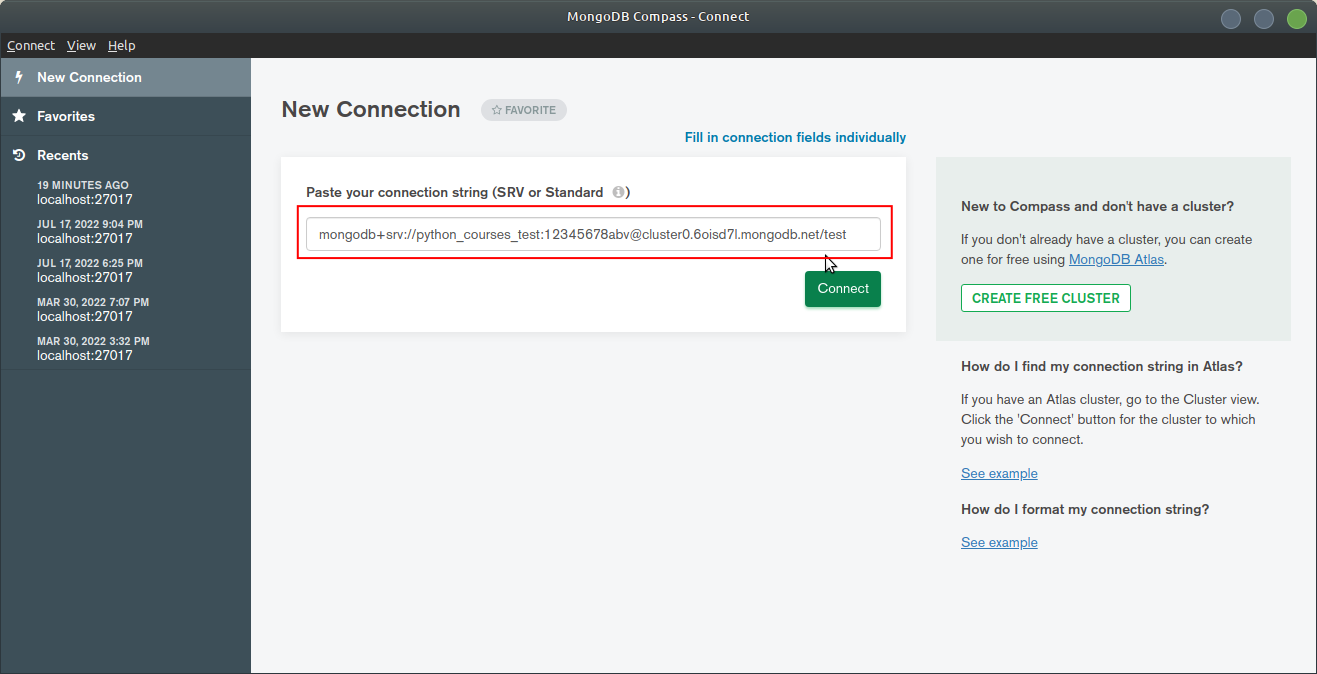
mongodb+srv://python_courses_test:12345678abv@cluster0.6oisd7l.mongodb.net/test
- Open MongoDB Compass and in "New Connection" window paste the connection string
Use Python with MongoDB
PyMongo - a Mongodb Python's driver
Overview
- To access a MongoDB from our Python application we need a MongoDB Python driver
- The official ones are:
- pymongo is the recommended driver to work with MongoDB using Python.
- motor is the recommended driver for when you need non-blocking, asynchronous access to MongoDB using Python.
- In these course we'll be using pymongo
- We'll also need the dnspython - a DNS toolkit for Python for queries, zone transfers, dynamic updates, nameserver testing. I.e. for using
mongodb+srv://URIs
            # install pymongo driver
            pip install pymongo

            # install dnspython
            pip install dnspython
Connect to Mongodb
            from pymongo import MongoClient

			def connect_to_local_cluster():
				# connect using connection string:
				# 'mongodb://<username?>:<password?>@localhost:27017/<dbname?>
				connection_string = 'mongodb://localhost:27017/python_course'

				return MongoClient(connection_string)


			def connect_to_atlas_cluster():
				# connect using connection string:
				# mongodb+srv://<username>:<password>@cluster0.xm0yw.mongodb.net/<dbname?>
				connection_string = 'mongodb+srv://power_user:q1a2z3@cluster0.xm0yw.mongodb.net/'

				return MongoClient(connection_string)

			atlas_client = connect_to_atlas_cluster()
			local_client = connect_to_local_cluster()

			# list databases
			print(atlas_client.list_database_names())
			print(local_client.list_database_names())